|

  
| |
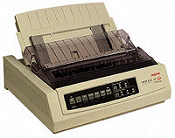
- ML320/321 Printer
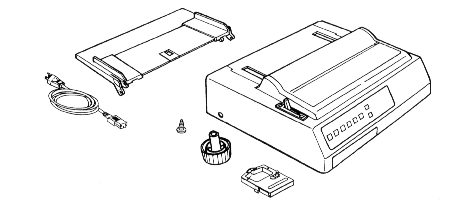
- Paper separator
- Power cord
- Platen knob
- Ribbon cartridge
- Grounding screw
- Customer service guide
- Reference Guide
- Setup guide
[back to top]
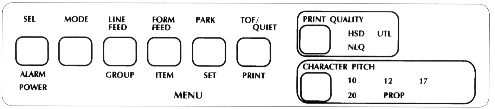
- SEL Light: When this light is ON, the printer is selected and ready to
receive data from teh computer.
- SEL button: Push this button to select or deselect the printer.
- Alarm Light: this light indicates either that paper is out or that there
may be a hardware problem requiring service
- Power light: This light indicates that the printer is turned on.
- Print Quality
- NLD: Near Letter Quality. (2 passes of the printhead)
- UTL: Utility (Medium report quality)
- HSD: High speed draft. Fastest print at the lowest quality.
- Character Pitch: select one of the following 10, 12, 17, 20cpi. You
cannot print 17 and 20cpi in NLQ.
- Mode Button: This button controls the functions of the next four buttons
on the panel.
- Line feed button: press this button to advance the paper one line.
- Form feed button: press this button to advance the paper one page.
- Park button: use this button with continuous-form paper. When you
press it, the paper retracts from the front of the printer so you can use
single sheets without completely removing the continuous forms.
- TOF/QUIET button: When the printer is deselected, press this button to set
the position onf the first print line on the page ("top of form").
- Turn off the printer
- Hold down the LF while turning on the printer (the printer produces a
sample of available print styles for one page).
- End test by turning the printer off
[back to top]
|

