IBM Server Site

IBS Home Up

Adjust charges onto an Account

To Adjust charges back onto an account you must do a negative payment or adjustment

Example 1

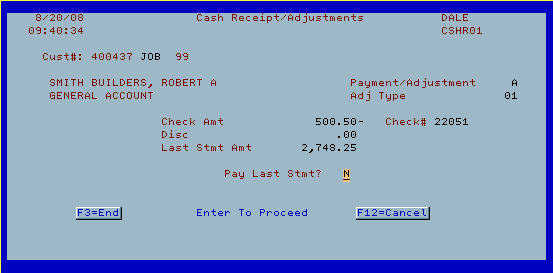
Screen 1

  • Enter check #,
  • amount
    • negative = ADD charges to account
    • positive number = pay charges OFF an account
  • discount amount
    • negative = ADD charges to account
    • positive number = pay charges OFF an account
  • payment or adjustment
    • P = money is being received or paid out (this is the default setting)
    • A = charges are being internally moved, or changed but no funds are being paid or received (Screen 1a will prompt after this is selected)
  • print receipt
    • Y = Yes print a receipt
    • N = Do not print a receipt (this is the default setting)

Screen 1a

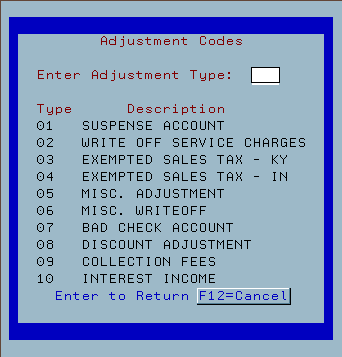
  • If you selected 'A' for adjustment this screen will prompt.
  • Select the most appropriate option then press ENTER.

Screen 2 - Account & amount verification

  • Verify the information and account are correct then press ENTER.

Screen 3 - Distribute the payment or adjustment

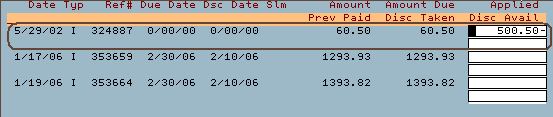
  • Distribute the payment or adjustment as necessary

[back to top]


Examples

Example 1

  • In this example $550.50 will be added to the existing charge of $60.50. The new balance would be $611.00 due on this charge.

Example 2

  • In this example $550.50 would be added to the existing charge of $1293.93. The new balance would be $1844.43 on this charge.

Example 3

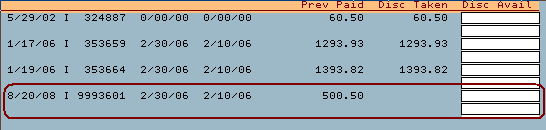
  • In this example the $550.50 would be charged as a new item by using 'F5' (Apply to unapplied).

[back to top]

IBS Lumber and Building Material Software Copyright © 2006 IBS Lumber Software Inc (TM)
Last modified: November 7, 2011

IBS Sales & Support 888-640-1252
Main Office 888-640-1252
Fax IBS 877-712-8937

All pages contained in this support website are not intended for general public distribution. Any material here can be considered private, confidential with various copyrights and restrictions against public release. You 'the browser' cannot legally release this information for general public distribution.

remote support: http://www.gotomeeting.com | remote support download program