IBM Server Site

IBS Home Up

Audit Inventory

How to Check the Sku Audit History

  1. Go to II (Inventory Inquiry)
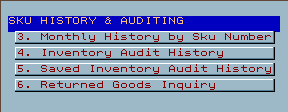
  2. Select Option 4 (Audit History)
  3. Type in your search criteria (sku, category, keyword, etc.)
  4. Tab down and "S" (select) your sku
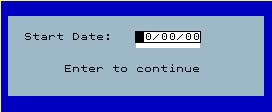
  5. Put in a start date (or just press ENTER) to continue
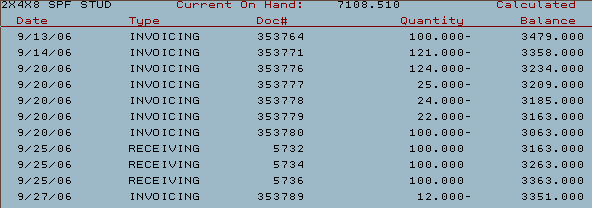
  6. All the sku history will display from oldest recorded to newest
  7. Review the following fields and press F12 to cancel when finished
  • Date - Date of transaction
  • Type
    • Beg Balance = Starting balance as entered into system
    • File Maint = Sku quantities were edited
    • Invoicing = An invoice or credit memo (Reference doc # for invoice number)
    • Phy Inventory = Sku quantities were modified during a physical inventory
    • Receiving = Received into inventory (Reference doc # for PO number)
    • Rework = sku was edit in the mill or rework area
    • Transfer = Sku was transferred into or out of inventory
  • Doc # (Invoice or Purchase Order associated with the inventory transaction)
  • Quantity
    • Total quantity on this transaction
  • Calculated balance
    • New calculated inventory balance

[back to top]

IBS Lumber and Building Material Software Copyright © 2006 IBS Lumber Software Inc (TM)
Last modified: November 7, 2011

IBS Sales & Support 888-640-1252
Main Office 888-640-1252
Fax IBS 877-712-8937

All pages contained in this support website are not intended for general public distribution. Any material here can be considered private, confidential with various copyrights and restrictions against public release. You 'the browser' cannot legally release this information for general public distribution.

remote support: http://www.gotomeeting.com | remote support download program