IBM Server Site

How to change time

Current US & GMT Time

Quick Time Change through the Menus

  1. Go to menu MU.
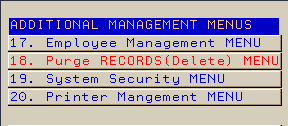
  2. Take option 19.
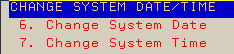
  3. Take option 7 (Change Time).
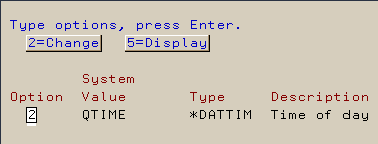
  4. Type a ‘2’ to change time and press ENTER.
  5. Key in the new system time and press ENTER
  6. Change is immediate but you will need to sign off/on for it to take effect.

Quick Time Change by a command line

  1. Go to a command line.
  2. Type wrksysval qtime then press ENTER.
  3. Type a '2' to change time and press ENTER.
  4. Key in the new system time and press ENTER.
  5. Change is immediate but you will need to sign off then back on for it to take effect.

Changing Time on the Main IBM Server

  1. Go to MU (Management Update)
  2. Take option 19 (System Security Menu)
  3. Take option 7 (Change system time)
  4. Type a "2" (Change)
  5. Type in the new time in military time (00:00:00 - 23:59:00)
  6. Press ENTER to update

[back to top]


Current Time Nationwide

[back to top]

IBS Lumber and Building Material Software Copyright © 2006 IBS Lumber Software Inc (TM)
Last modified: November 7, 2011

IBS Sales & Support 888-640-1252
Main Office 888-640-1252
Fax IBS 877-712-8937

All pages contained in this support website are not intended for general public distribution. Any material here can be considered private, confidential with various copyrights and restrictions against public release. You 'the browser' cannot legally release this information for general public distribution.

remote support: http://www.gotomeeting.com | remote support download program