|

 
| |
Column Format Codes
*WARNING:
DO NOT LEAVE THE COLUMN 1 field blank when
you format a file member! This will cause the following error message when
you attempt to run a financial statement:
Previous Statement Print Has
not Completed. JOB is CANCELLED.
If you get this error message call IBS 888-640-1252 to unlock the program.
IBS Personnel please review the following fix page
for this error.
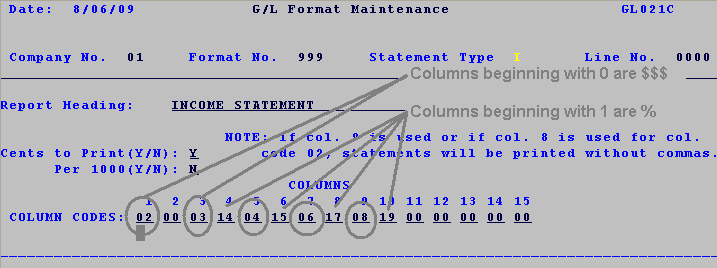
Note: The first digit in the column code indicates
whether this is a % or a $$$ field. 0 = $ and 1 = %.
Rules for the format member
-
0 = $$$ field
-
02, 00 = Whole
description field code (following column MUST be blank '00')
EXAMPLE
1
 this
format will print with commas this
format will print with commas
-
03 = Last year
-
05, 21 = Variance
(following column MUST be '21' to tie in previous year)
EXAMPLE

-
06 = prior year
EXAMPLE 06, 17 = previous year with a % breakdown column following
-
08 = YTD
EXAMPLE 08, 19 = YTD with a % breakdown column following
-
1 = % field
RULE OF NUMBERING
% signs are in sequential order 14
references 03, 15 references 04, 17 references 06, 19 references 08 and so
on.
-
11 = Variance
|

