IBM Server Site

IBS Home Up

Linux Installation Help

Arch Linux

Installing tn5250 on Arch Linux.

Homepage for tn5250: http://sourceforge.net/projects/tn5250/
File: http://superb-west.dl.sourceforge.net/sourceforge/tn5250/tn5250-0.17.3.tar.gz

My copy of File: http://crouse.us/files/TN5250/tn5250-0.17.3.tar.gz
My copy of TN5250 HowTo: http://crouse.us/files/TN5250/tn5250-HOWTO.pdf


Download and Install

Code:

AS USER:

wget http://superb-west.dl.sourceforge.net/sourceforge/tn5250/tn5250-0.17.3.tar.gz
mkdir ~/TN5250
mv tn5250-0.17.3.tar.gz ~/TN5250/
cd ~/TN5250/
tar -xzvf tn5250-0.17.3.tar.gz
echo "PATH=\$PATH:/opt/tn5250/bin" >> ~/.bashrc
echo "export PATH" >> ~/.bashrc

AS ROOT:

cd ~/home/USERNAME/TN5250/tn5250-0.17.3/
mkdir /opt/tn5250
./configure --prefix=/opt/tn5250
make
make install


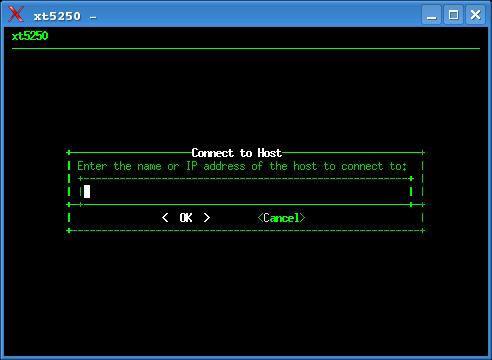
Now, logging into a terminal and typing "xt5250" will give you a screen that looks like this:


I make alias's in my .bashrc file for starting different sessions from the command line.........
Code:

# Alias's to TN5250 programs. AS400 access commands.
alias d1="xt5250 env.TERM = IBM-3477-FC env.DEVNAME="D1" 192.168.2.5 &"
alias d2="xt5250 env.TERM = IBM-3477-FC env.DEVNAME="D2" 192.168.2.5 &"
alias d3="xt5250 env.TERM = IBM-3477-FC env.DEVNAME="D3" 192.168.2.5 &"
alias d4="xt5250 env.TERM = IBM-3477-FC env.DEVNAME="D4" 192.168.2.5 &"
alias t1="tn5250 env.TERM = IBM-3477-FC env.DEVNAME=D1 192.168.2.5"
alias t2="tn5250 env.TERM = IBM-3477-FC env.DEVNAME=D2 192.168.2.5"


Startup of "d3" (short for Dave session#3 Smile )now looks like this when you use "d3" :
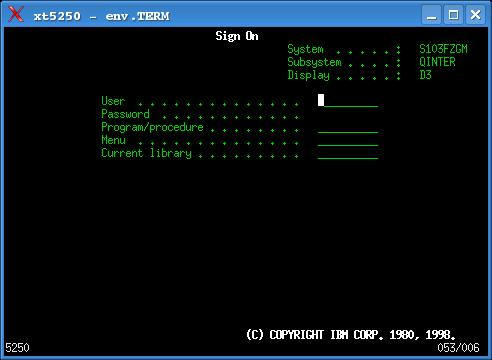
Linux tn5250 sign on screen
Notes:
the alias in .bashrc for tn5250 vs xt5250 makes connections 2 different ways...
CTL+SHIFT+F12 gives you F24 in a xt5250 session.
CNTL + click the RIGHT mouse button, and VT FONTS selection box.
CNTL + click the LEFT mouse button, MAIN OPTIONS menu.


IBS Lumber and Building Material Software Copyright © 2006 IBS Lumber Software Inc (TM)
Last modified: November 7, 2011

IBS Sales & Support 888-640-1252
Main Office 888-640-1252
Fax IBS 877-712-8937

All pages contained in this support website are not intended for general public distribution. Any material here can be considered private, confidential with various copyrights and restrictions against public release. You 'the browser' cannot legally release this information for general public distribution.

remote support: http://www.gotomeeting.com | remote support download program