IBM Server Site

IBS Home Up

KDS 17" XF-7d CRT Monitor

How to install or remove the swivel base

  1. Turn off and unplug monitor.
  2. Turn the monitor on this side or upside-down.
  3. Locate the cavities at the bottom of the monitor.
  4. Insert the pegs "3a" on the swivel base into these cavities. Push firmly toward the front (CRT direction) of the main unit until the latch "3b" at the bottom of the monitor clicks shut. This locks the swivel base into place.
  5. To remove the swivel base, use your thumb to push "3b" to disconnect the latch properly, push down firmly and pull the base against the main unit. The base removes from the attached position.

Timing Guide

Mode

Resolution

Fh,

Fv.

1 720x400 31.47 70
2 640x480 31.47 60
3 640x480 43.27 85
4 800x600 37.88 60
5 800x600 46.87 75
6 800x600 53.67 85
7 800x600 63.90 100
8 1024x768 48.36 60
9 1024x768 60.02 75
10 1024x768 68.67 85
  • Fh: Horizontal Frequency (KHz)
  • Fv: Vertical Frequency (Hz)

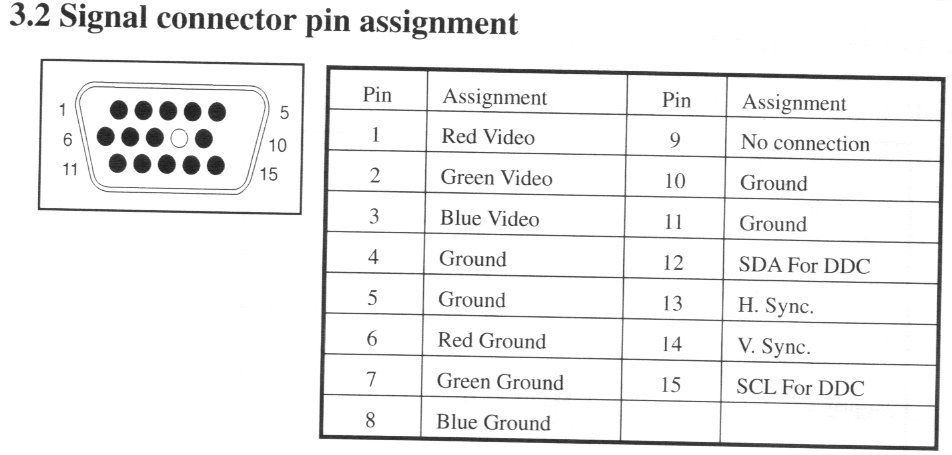
Signal Connector Pin Assignment

IBS Lumber and Building Material Software Copyright © 2006 IBS Lumber Software Inc (TM)
Last modified: November 7, 2011

IBS Sales & Support 888-640-1252
Main Office 888-640-1252
Fax IBS 877-712-8937

All pages contained in this support website are not intended for general public distribution. Any material here can be considered private, confidential with various copyrights and restrictions against public release. You 'the browser' cannot legally release this information for general public distribution.

remote support: http://www.gotomeeting.com | remote support download program