IBM Server Site

IBS Home Up

MU 17, 4 - Client Access/400

When to use this menu

  • add users here only when they need direct access via Excel or Quatro Pro programs
  • you do not need to use this option if they only need signon ability

Quick setup instructions

  • go to MU (Management Update)
  • select option 17 (Employee Management)
  • select option 4 (Client Access)
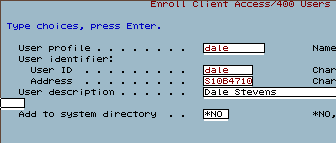
  • Add the following fields
    • User profile - the user signon name
    • User Id - the user signon name (same as above)
    • User description - the full name of the user

Completed Screen Example

MU 17, 4 - Client Access

IBS Lumber and Building Material Software Copyright © 2006 IBS Lumber Software Inc (TM)
Last modified: November 7, 2011

IBS Sales & Support 888-640-1252
Main Office 888-640-1252
Fax IBS 877-712-8937

All pages contained in this support website are not intended for general public distribution. Any material here can be considered private, confidential with various copyrights and restrictions against public release. You 'the browser' cannot legally release this information for general public distribution.

remote support: http://www.gotomeeting.com | remote support download program