IBM Server Site

IBS Home Up

MU 13-14 - Physical Inventory Options

Important Notes

  • If your system was installed in 2008 or later you will not have these options!
  • These options refer to the IBS Physical Inventory Menu (I2). This may or may not be the method you use to count your inventory. If you use cycle counts then these options are not applicable to you.

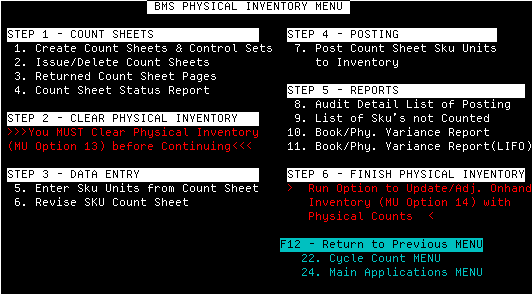
Physical Inventory Menu I2

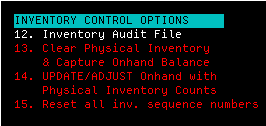
MU Options 13-14

Option 13 (P0913) - Clear Physical Inventory

  • This option clears the physical inventory and prepares a blank file for counting

Option 14 (P0914) - Update/Adjust Onhand with Physical Inventory Counts

  • This option posts the counted inventory into the system.

IMPORTANT NOTE 1 (MU 14)

  • no one else can be signed onto the system to finalize the inventory!

IMPORTANT NOTE 2 (MU 14)

  • All count sheets must be turned in, deleted or accounted for before you can post the new inventory!

IBS Lumber and Building Material Software Copyright © 2006 IBS Lumber Software Inc (TM)
Last modified: November 7, 2011

IBS Sales & Support 888-640-1252
Main Office 888-640-1252
Fax IBS 877-712-8937

All pages contained in this support website are not intended for general public distribution. Any material here can be considered private, confidential with various copyrights and restrictions against public release. You 'the browser' cannot legally release this information for general public distribution.

remote support: http://www.gotomeeting.com | remote support download program