|

 
| |
PP 1 - Payroll Company Setup
To start a payroll...
- Go to menu PP (Payroll Process)
- Select option '1' (Company Setup)
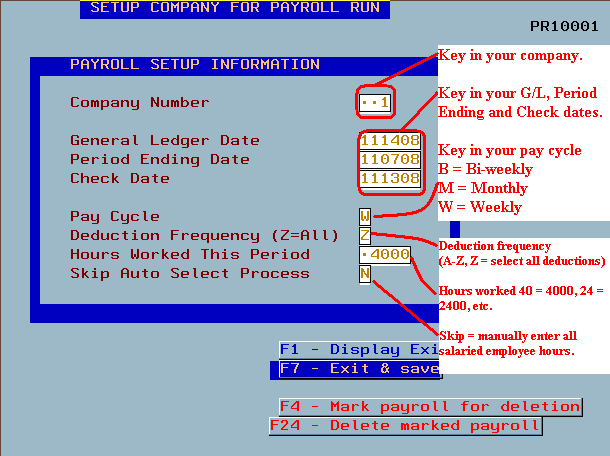
- Key in each of the fields as follows:
- Company# - Key in a valid company number (usually 001 or 002, etc.)
- General ledger date - this is the date that this payroll run will
post to the General Ledger
- Period ending date - this is the date that this payroll ended
- Check date - this is the date that will be printed on the checks
- Pay cycle - W = Weekly, B = Bi-weekly, M = Monthy (or per Pay
period)
- Deduction frequency - A-Z (Z = take all deductions)
- example - if you have deductions A, B, C, and D
but only want to take A and B you would select B for deduction
frequency.
- If you wanted A-C only you would select 'C' for
deduction frequency.
- Hours worked this period - key in 4000 for standard hours for all
salaried employees.
- all numbers have 2 implied decimals 20 hours =
2000, 24 hours = 2400, etc.
- Skip auto select process -
- Y = this will skip all salaried employees.
Any salary employees must be entered manually.
- N = auto select all salaried employees. Any
salary employees will have hours and pay auto generated.
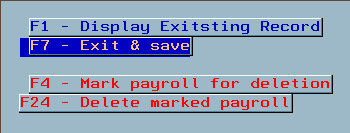
- Function key options
- F1 - display existing record (if it exists)
- F7 - save and exit (save and exit this menu)
- F4 - mark existing record for deletion (delete
the company payroll)
- F24 (shift + F12) - delete marked payroll (delete
the marked payroll so you can start over)
- Once complete Exit this screen by pressing F7 (Save and exit)
Screen 1
Errors
Company # invalid
- If you receive the message 'company number is invalid.' Check the
company number and rekey the information.

Not on disk Error
- If you receive the following error when you start payroll type a '3'
(Cancel) and press ENTER.
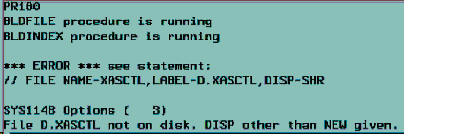
- You must contact IBS before continuing.
|

