IBM Server Site

IBS Home Up

Testing Your Tape Drive

Test 1 - Check the drive

Tape Drive Test

  • wrkcfgsts *dev
  • check status of TC
    • failed = needs to be varied off then on
    • varied off = needs to be varied on
    • varied on = needs to be varied off then on
  • vary off 'tc' (tape cartridge)

Test 2 - initialize a tape

Initializing a tape from the MENU

  • go to menu MP 1, 15 (One step tape initialization)

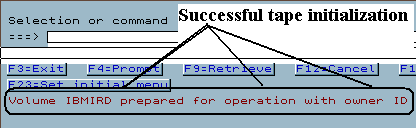
    Successful test = the following message at the bottom of the screen

    • Volume IBMIRD prepared for operation with owner ID ~.

Initializing a tape from a command line

  • type in the following command then press enter

    INZTAP DEV(TC) DENSITY(*CTGTYPE)

    Successful test = the following message at the bottom of the screen

    • Volume IBMIRD prepared for operation with owner ID ~.

Test 3 - backup a single file or library

  • type in the following command then press enter

    SAVLIB

    Successful test = the following message at the bottom of the screen

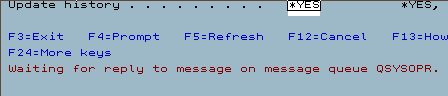
    Unsuccessful test = the following message at the bottom of the screen

    Example 1 of a failed tape backup

    • This indicates that a problem exists during the test backup.
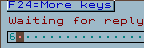
    • To see what the error message is do a shift + systems attention then type a '6' on the dotted line and press ENTER.
    • This message indicates that there is a tape drive fault error. Contact your service provider for more information.
IBS Lumber and Building Material Software Copyright © 2006 IBS Lumber Software Inc (TM)
Last modified: November 7, 2011

IBS Sales & Support 888-640-1252
Main Office 888-640-1252
Fax IBS 877-712-8937

All pages contained in this support website are not intended for general public distribution. Any material here can be considered private, confidential with various copyrights and restrictions against public release. You 'the browser' cannot legally release this information for general public distribution.

remote support: http://www.gotomeeting.com | remote support download program