|

 
| |
Date/Time
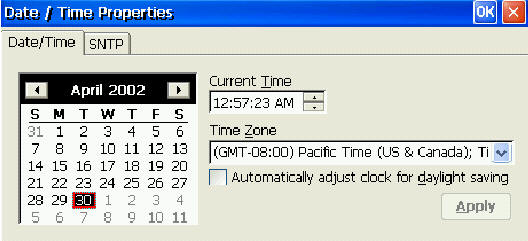
Date/Time Dialog Box
• Calendar/Current Time. These settings can be useful in browser sessions, when
date stamping a site printout, and the time is also displayed in the System Tray
in Desktop style.
• Time Zone. Time Zone has two uses:
o It allows the user, when logging on to a MetaFrame XP server in a different
time zone, to have the ICA sessions reflect the time zone of the local terminal.
For example, a user in London (Greenwich Mean Time) logs onto a MetaFrame XP
server in New York City (Eastern time zone), and launches Microsoft Outlook as a
published application; Microsoft Outlook stamps emails sent during this ICA
session with the user’s GMT time zone information.
o When SNTP synchronization is used (see below), Time Zone provides the correct
offset from the timeserver base time
|

