|

 
| |

Text Version Below
How to create a GW.log file
Please follow the instructions below: To trace GW.LOG:
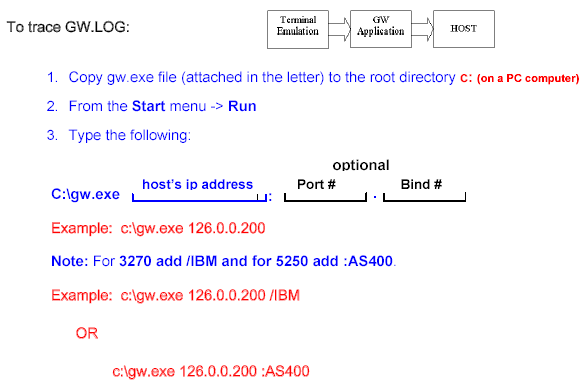
1. Copy gw.exe file (attached in the letter) to the root directory c: (on a PC
computer)
2. From the Start menu -> Run
3. Type the following:
optional C:\gw.exe Example: c:\gw.exe 126.0.0.200
Note: For 3270 add /IBM and for 5250 add :AS400.
Example: c:\gw.exe 126.0.0.200 /IBM
OR
c:\gw.exe 126.0.0.200 :AS400
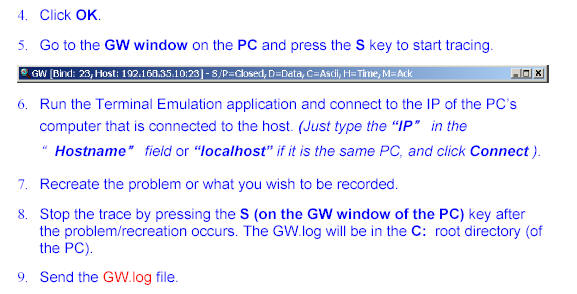
4. Click OK.
5. Go to the GW window on the PC and press the S key to start tracing.
6. Run the Terminal Emulation application and connect to the IP of the PC’s
computer that is connected to the host. (Just type the “IP” in the Hostname
field or “localhost” if it is the same PC, and click Connect ). “”
7. Recreate the problem or what you wish to be recorded.
8. Stop the trace by pressing the S (on the GW window of the PC) key after the
problem/recreation occurs. The GW.log will be in the C: root directory (of the
PC).
9. Send the GW.log file.
,
host’s ip address
Port #
Bind #
:
|

