IBM Server Site

IBS Home Up

Workstation Configuration

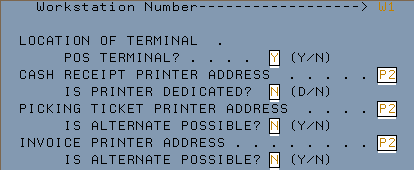
POS Terminal & Default Workstation Printer Addresses

POS Terminal

  • Y = you can do sales, quotes & PO's from this workstation
  • N = you cannot do sales, quotes or PO's from this workstation

Cash Receipt Printer Address

  • Type in the primary Cash Receipt printer address
  • If you do not have a Cash Receipt printer use the Invoice printer

Is Printer Dedicated

  • Y = No other workstation can use the printer (use this only for checkout lanes)
  • N = Others may access this printer

Picking Ticket Printer Address

  • Type in the primary Picking Ticket printer address
  • If you do not have a dedicated Picking Ticket printer use the Invoice printer

Is Alternate Possible

  • Y = There are other printers to select from
  • N = There are no other printers to select from, use only the default.

Alternate Printer Locations & Default Report Printers

Alternate Picking Ticket Addresses

  1. Put in your 1st Printer address here
  2. Put in your 2nd Printer address here or XX if you don't have one
  3. Put in your 3rd Printer address here or XX if you don't have one
  4. Put in your 4th Printer address here or XX if you don't have one
  5. Put in your 5th Printer address here or XX if you don't have one

Alternate Invoice Addresses

  1. Put in your 1st Printer address here
  2. Put in your 2nd Printer address here or XX if you don't have one
  3. Put in your 3rd Printer address here or XX if you don't have one
  4. Put in your 4th Printer address here or XX if you don't have one
  5. Put in your 5th Printer address here or XX if you don't have one

Cash Drawer Address (C.D.'s)

  • Put in your default Cash Drawer report address (usually P1)

Purchase Orders (P.O's)

  • Put in your default Purchase Order address (often P1 or a local PC printer)

Receiving Documents

  • Put in your default Receiving Report Address (often P1 or a local PC printer)

Quotes

  • Put in your default Quote printer (often P1 or a local PC printer)

Cash Drawer Codes

Cash Drawer Codes

  • 1-8 Put in the default cash drawer that this workstation is dedicated to usually '01' or '02'

Default Alternate Printer Selections & Document Codes

Default Alternate Printer Selection (Picking Ticket)

  • Select 1 printer from the Alt P/T fields to default to when doing a sale

Default Alternate Printer Selection (Invoice)

  • Select 1 printer from the Alt Invoice fields to default to when doing a sale

Default Document Codes

1= Always Default to Picking Ticket
2= Always Default to Invoice
3= Always Default to Cash Receipt

  • Picking Ticket/Invoice (P.T./INV.)
  • Picking Ticket/Cash Receipt (P.T./C.R.)
  • Invoice/Cash Receipt (INV./C.R.)
  • Picking Ticket/Invoice/Cash Receipt (P.T./INV./C.R.)

IBS Lumber and Building Material Software Copyright © 2006 IBS Lumber Software Inc (TM)
Last modified: November 7, 2011

IBS Sales & Support 888-640-1252
Main Office 888-640-1252
Fax IBS 877-712-8937

All pages contained in this support website are not intended for general public distribution. Any material here can be considered private, confidential with various copyrights and restrictions against public release. You 'the browser' cannot legally release this information for general public distribution.

remote support: http://www.gotomeeting.com | remote support download program