IBM Server Site

IBS Home Up

How to distribute a credit

Credit Distribution Rules!

  • If the credit has been through your statement cycle one or more times the system will auto-distribute the credit to the oldest. invoices every time you go in to make a payment or adjustment.
  • If the credit has not been through your statement cycle you can manually apply the credit.
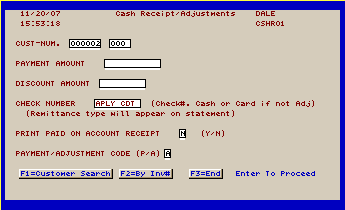
  • You do not need to put a $$$ amount in the payment field if you are only applying a credit. You can leave this field blank and go straight to the payment application screen.

Example 1

  1. First enter in the customer information and payment amount. The payment field can be left blank if this is just a credit application
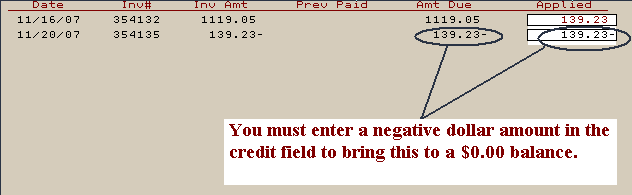
  2. Next put the negative $$$ amount in the credit field and the positive $$$ amount in the field where you want the credit applied.
  3. Press F1 to finish and post the distributed credits to the account.

[back to top]

IBS Lumber and Building Material Software Copyright © 2006 IBS Lumber Software Inc (TM)
Last modified: November 7, 2011

IBS Sales & Support 888-640-1252
Main Office 888-640-1252
Fax IBS 877-712-8937

All pages contained in this support website are not intended for general public distribution. Any material here can be considered private, confidential with various copyrights and restrictions against public release. You 'the browser' cannot legally release this information for general public distribution.

remote support: http://www.gotomeeting.com | remote support download program