|

 
| |
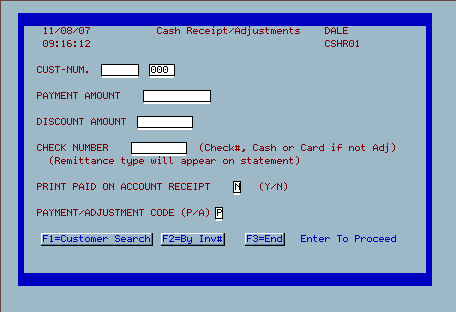
RU 1 (Screen 2) - Payment & Adjustments Screen
Field Definitions
- Customer Number - type the customer number in or press F1 to search by
customer.
- Payment Amount - type the $$$ payment or adjustment amount that you are
posting
- Example 1 - a customer makes a $50.00 payment --> type 50.00 in the
field
- Example 2 - a customer check for $50.00 is returned by the bank and
you want to add $50.00 in charges to the account --> type 50.00- in the
field
- Discount Amount - if you offer prompt pay or other discounts type the
amount of discount that the customer is taking into this box.
- Check Number - key in a check number or statement reference
- examples of adjustment notes used: PYMT ADJ, ADJ CREDIT, RTN CK, ADJ,
etc.
- Print Paid on account receipt - type a 'y' to print a paid on account
receipt or a 'n' for no receipt.
- Payment adjustment code - type 'p' for payment or 'a' for adjustment
Payment examples -
- a customer pays his/her bill (this is a positive payment to account)
- you write a check for a credit balance to a customer (this is a
negative payment to account).
Adjustment examples
- you adjust off service charges - this is a positive adjustment to
account
- you adjust on returned check fees, charges - this is a negative
adjustment to account
- F1 - Customer lookup
- F2 - Pay by invoice
- F3 - End
- Enter to continue
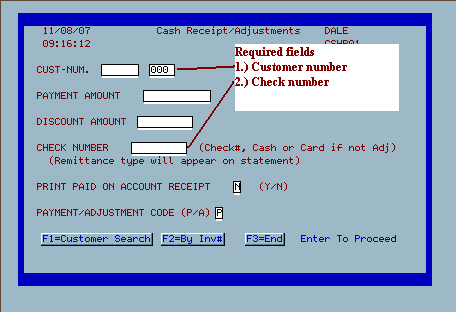
Required Fields
|

.htm_cmp_ibs-support-theme010_bnr.gif)