IBM Server Site

IBS Home Up

I can't post payments to an account in RU #1

Problem

  • The workstation most likely lost connection while you were entering account information for a customer. Now that customer is locked.

Resolution From A Menu

  • If you have a newer IBS release
    • Go to RU
    • Select option #19 (Clear locked account)
    • try to enter the account payment again (RU #1)

Command Line Resolution

If you don't have the menu option try the following

  1. go to a command line
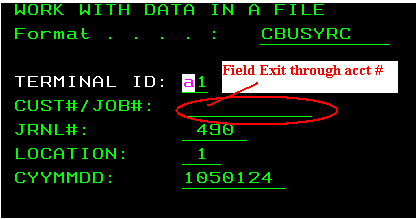
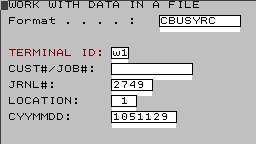
  2. type upddta cbusy then ENTER
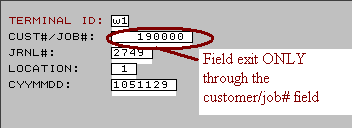
  3. page up/down until you spot the account number
  4. FIELD EXIT through the account number field then press ENTER
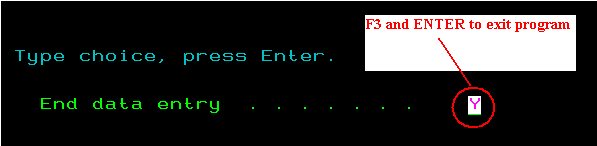
  5. F3 and ENTER again to exit
  6. try to enter the account payment again (RU #1)
  • If you can't run this program or it is not installed call IBS for further assistance

Why this occurs

  • This happens when one of the following specific events occurs.
    • power loss while posting payments
    • closing out a screen while posting payments
    • loss of power

[back to top]

IBS Lumber and Building Material Software Copyright © 2006 IBS Lumber Software Inc (TM)
Last modified: November 7, 2011

IBS Sales & Support 888-640-1252
Main Office 888-640-1252
Fax IBS 877-712-8937

All pages contained in this support website are not intended for general public distribution. Any material here can be considered private, confidential with various copyrights and restrictions against public release. You 'the browser' cannot legally release this information for general public distribution.

remote support: http://www.gotomeeting.com | remote support download program