IBM Server Site

IBS Home Up

Standard Cash Drawer Checkout

Where the numbers go

  • Sales figures are posted to the general ledger once the daily invoice register has been run (GU 3)
  • You should match your cash drawer balances to the invoice register totals. Both figures will match.

Step by Step

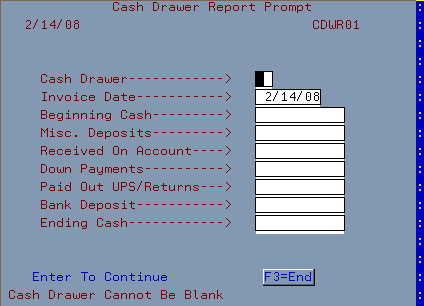
  • Go to the cash drawer report option SR 1 (MP 1)
  • Enter the required fields
    • Cash drawer - Enter cash drawer number (usually '01')
    • Date - today's date will display
      If you want to run a cash drawer report for a previous day then change the date as necessary
  • Optional fields that will help you balance more quickly
    • Beginning cash - the cash in the till prior to any daily transactions
    • Misc. deposits - any deposits made off the books
      • vending machines
      • cash found
      • other...
    • Received on account - this contains any payments made through SU 1 (F10).
      • If you have additional payments on account that have not been entered into your receivables, you can type them in here.
    • Down payments - this includes any layaway payments received or other down payments
    • Paid out UPS/Returns - this includes any paid out cash, I.O.U.'s, and other events where you took cash out of the drawer
    • Ending cash - this is your final ending balance

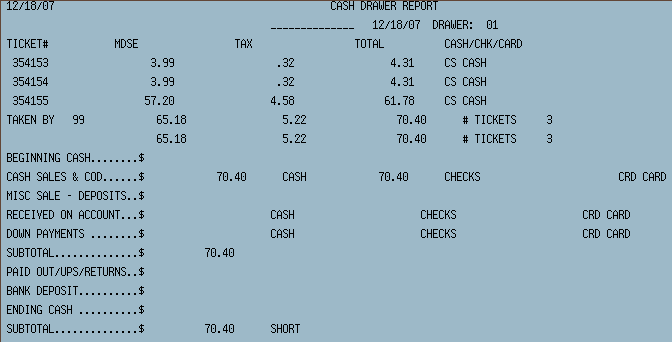
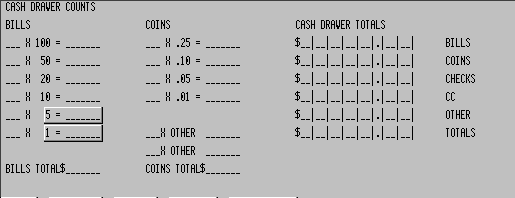
Sample Report

[back to top]

IBS Lumber and Building Material Software Copyright © 2006 IBS Lumber Software Inc (TM)
Last modified: November 7, 2011

IBS Sales & Support 888-640-1252
Main Office 888-640-1252
Fax IBS 877-712-8937

All pages contained in this support website are not intended for general public distribution. Any material here can be considered private, confidential with various copyrights and restrictions against public release. You 'the browser' cannot legally release this information for general public distribution.

remote support: http://www.gotomeeting.com | remote support download program