IBM Server Site

IBS Home Up

GI 9 - A/P Check Listing

Overview

What does this option do?

This option provides a quick reference for which transaction have been posted by account and the order in which they occurred.

When should I take this option?

Select this option whenever you need a quick review of account postings.

What fields are displayed

  • Company - the company number is displayed.
  • Period - The period is displayed
  • Transaction Date - the date this was created is displayed.
  • GL Account Number - the account number is displayed.
  • Detailed description - the detailed description is displayed.
  • Transaction amount - the transaction amount is displayed.
  • Code -
    • D = Debit or
    • C = Credit transaction code is displayed
  • Check # - the person running the invoice number or check number is displayed.
  • Source - the source of the transaction is displayed.
    • A/P = Accounts Payable
    • IBS POST = Invoice Register
    • Anything else or [OTHER] = General Ledger Journal Entry

Examples

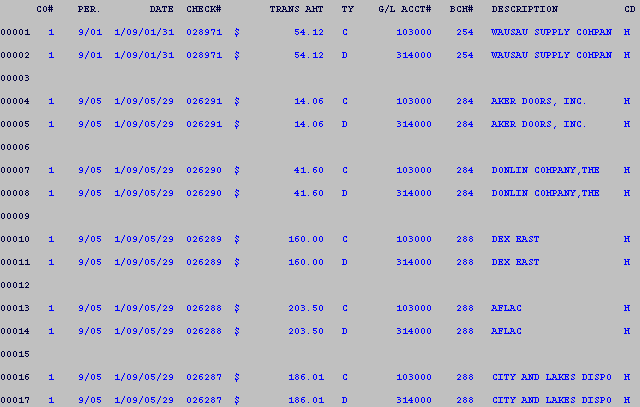
Example of a G/L Listing

  • This screen lists all G/L Transactions by account from the most recent period backwards.

IBS Lumber and Building Material Software Copyright © 2006 IBS Lumber Software Inc (TM)
Last modified: November 7, 2011

IBS Sales & Support 888-640-1252
Main Office 888-640-1252
Fax IBS 877-712-8937

All pages contained in this support website are not intended for general public distribution. Any material here can be considered private, confidential with various copyrights and restrictions against public release. You 'the browser' cannot legally release this information for general public distribution.

remote support: http://www.gotomeeting.com | remote support download program