| We have updated most of
the new files on this site to provide you
with self-extracting diskette images. To
extract the image, just execute the file
once it is stored on your hard disk,
and insert a floppy in the "A" drive. You
will be required to read a license agreement
and agree to its terms before a diskette
will be created. If
a diskette image file has a DSK extension
you must use the
LOADDSKF utility to expand it to a
diskette. Use an archiving tool such as
PKUNZIP for files with a ZIP extension.
|
TCP/IP or SNA Combo You make
the choice during the installation -
Win9x/NT/2000 required |
|
This new installation
works like nothing we have ever released
before! We used some new tools and
techniques to make installing IBM 5250
Adapter Support easier for our Customers.
TCP/IP over Twinax and SNA support for
Client Access and Personal Communications
are all in one package. You have the option
of a single large file to Install for the
Web, or four diskette images for 1.4Mb
Floppy disks. You don't need both...
Windows 2000 Users:
Your only option at present is TCPIP over
Twinax. This package will detect your
Windows 2000 installation and install only
the TCPIP over Twinax driver. You also get
the Native Diagnostics and Twinax Config v3
during this installation.
Download the latest
5250 Hardware Support Package
5250 Express Adapter Family
Installation, Driver and Diagnostic
Express_v520.EXE | Package File 1 of
1 | Version 5.20 | FileSize 3832k
Includes Support for: Windows 95,
98, NT and Windows 2000.
- OR -
5250 Express Adapter
Family Installation, Driver and
Diagnostic
DISK1_v5.EXE | Diskette 1 of 4 |
Version 5.20 | FileSize 779k
5250 Express Adapter
Family Installation, Driver and
Diagnostic
DISK2_v5.EXE | Diskette 2 of 4 |
Version 5.20 | FileSize 1471k
5250 Express Adapter
Family Installation, Driver and
Diagnostic
DISK3_v5.EXE | Diskette 3 of 4 |
Version 5.20 | FileSize 1472k
5250 Express Adapter
Family Installation, Driver and
Diagnostic
DISK4_v5.EXE | Diskette 4 of 4 |
Version 5.20 | FileSize 258k
Show
me more about TCP/IP
If your AS/400 is running OS/400
V4R2,
download the free IP over Twinax
driver
Version 5.20 |
|
|
5250 Diagnostic Works inside
your operating environment -
Win9x/NT required |
|
5250 Family Diagnostic -
for Express and Legacy Adapters - Works
above 1Mb
InstallDiag5250.exe | Install
Program | Version 3.03 | FileSize 1222k
|
5250 Express Adapter Legacy Support |
|
These diskette images are for software support
and diagnostic utility. Support for the new
Express Family as well as our previous ISA,
PCMCIA, and 5250 /A offerings. This
Diagnostic may fail on PCI Adapters if
your PC allocates memory for it above 1Mb.
(Use this
version to solve that issue.)
Please be sure to get both
diskettes to complete your set. The part
numbers listed in each are the DISKETTE part
numbers for manufacturing and cannot be
ordered from IBM.
The U.S. English version
of these diskettes have the new 5250 Lite
program on them. IBM 5250 Lite will allow
you to choose a Display station address
quickly and easily to get users on-line
fast!
These diskettes are the
latest version of Adapter Support for OS/2.
These diskettes contain
SNA SUPPORT FOR:
- Client Access
- 5250 Enhanced Link
3.0 for DOS
- 5250 Express Program
4.0 for DOS
- Personal
Communications
5250 Express Adapter
Family Installation, Driver and
Diagnostic
2 Diskette Set and installation
instructions
for Client Access, 5250 Enhanced Link
3.0 for DOS, & Personal Communications
Diskette 2 of this set contains the
DIAGNOSTIC software...
5250 Express Adapter
Family Installation, Driver and
Diagnostic
09J8769.EXE | Diskette 1 of 2 |
Version 2.04 | FileSize 1011
5250 Express Adapter
Family Installation, Driver and
Diagnostic
09J8772.EXE | Diskette 2 of 2 |
Version 2.04 | FileSize 933k
5250 Express Adapter
Family Installation, Driver and
Diagnostic
05J4524.EXE | Diskette 1 of 2 |
Version 2.04 | FileSize 1013
5250 Express Adapter
Family Installation, Driver and
Diagnostic
05J4527.EXE | Diskette 2 of 2 |
Version 2.04 | FileSize 937k
5250 Express Adapter
Family Installation, Driver and
Diagnostic
05J4518.EXE | Diskette 1 of 2 |
Version 2.04 | FileSize 1011
5250 Express Adapter
Family Installation, Driver and
Diagnostic
05J4521.EXE | Diskette 2 of 2 |
Version 2.04 | FileSize 934k
5250 Express Adapter
Family Installation, Driver and
Diagnostic
05J4514.EXE | Diskette 1 of 2 |
Version 2.04 | FileSize 983k
5250 Express Adapter
Family Installation, Driver and
Diagnostic
05J4517.EXE | Diskette 2 of 2 |
Version 2.04 | FileSize 953k
These files should
only be downloaded if you have direction
to do so from IBM 5250 Emulation
Customer Support. Most are specifically
for the Express Adapters, and
might possibly cause you more harm than
good without direction.
|






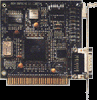 ISA 5250 Card (Not
common)
ISA 5250 Card (Not
common)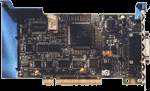 PCI 5250 Card
 PCMCIA