IBM Server Site

IBS Home Up 101-key keyboard 5251 Keyboard Bosanova 122 Ergonomic Kb FCC Class B IBM KB8923 KB Warning Keyboard Photos

Warranty Information

Equipment Purchased directly from IBS Corporation
  • < 30 days failure
    If equipment failure is less than 30 days from date of purchase call IBS for replacement.
  • > 30 days failure
    If equipment failure is greater than 30 days from date of purchase you must contact the manufacturer. IBS can assist with phone numbers or directions to their websites if requested.
  • If equipment failure is covered under an extended warranty separate from the manufacturer warranty you must contact the extended warranty specialists. All documentation is included with the original equipment delivery.

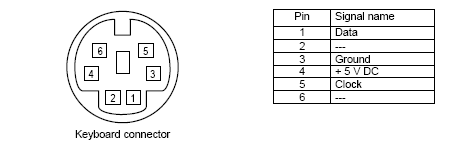
Standard Keyboard Connections

  • Mini-din or PS/2 Connections

IBS Keyboard Notes

  • The Command Keys (i.e Cmd) shown at the bottom of each screen can be used for various functions. The functions of each Cmd are listed immediately following the Cmd #. Only those Cmd keys that are highlighted are active for that particular screen.
  • ☞ Please note that on some keyboards the Cmd keys may be different (i.e. F1-F12, F1-F24, CF1-CF24, etc.) These keys though marked differently will still produce the same Command feature.
    Example of the top row on a standard PC/AT keyboard
    Esc F1 F2 F3 F4 F5 F6 F7 F8 F9 F10 F11 F12
  • ☞ PC Keyboards:
    Many Personal Computer (i.e. PC) keyboards contain only be twelve Command/Function keys. In order to use the Cmd 13 - Cmd 24 keys you must press and hold down the Shift key then press the desired F1-12 key. Holding the Shift key down adds twelve to the Command/Function key on this type of Keyboard thus creating the additional Command/Function keys.
  • ☞ In certain cases older keyboards may retain the Command/Function keys on the left side of the keyboard
IBS Lumber and Building Material Software Copyright © 2006 IBS Lumber Software Inc (TM)
Last modified: November 7, 2011

IBS Sales & Support 888-640-1252
Main Office 888-640-1252
Fax IBS 877-712-8937

All pages contained in this support website are not intended for general public distribution. Any material here can be considered private, confidential with various copyrights and restrictions against public release. You 'the browser' cannot legally release this information for general public distribution.

remote support: http://www.gotomeeting.com | remote support download program