IBM Server Site

IBS Home Up

Ethernet Line Recovery

Step 1 - Check for System Operator Messages

  • Shift-Sys Attn [Shift-Escape]
  • On the dotted line at the bottom of the screen type a '6' (Sys Operator Messages) then press ENTER.
  • Look for any messages requiring a response. C and R are most common.
  • Read the message if the line (cable) problem has been resolved type an 'R' (Retry) then press ENTER.
    • DO NOT SELECT 'C' (Cancel) or you will shut down the device internally!

Step 2 - Check Line Status

  • Go to a command line.
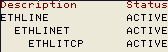
  • Type 'WRKCFGSTS *LIN' (Work with Line Configurations) then press ENTER.
  • Check the current line status
    • ACTIVE = This line is active and online.
    • VARIED OFF = This line has been shut down
    • VARY ON PENDING = The system is attempting to communicate with this line but it is not yet active.
    • FAILED = The line has failed or the maximum number of retry attempts has been reached.
  • If the line says 'FAILED' type a '2' (Vary Off) beside the failed line then press ENTER.
  • Next type a '1' (Vary On) beside the failed line and press ENTER.
  • Check the line status again (F5 = Refresh Screen)
    • If the line says active continue to the next step
    • If the line says vary on pending or failed call IBS.

Step 3 - Check for TCP line status

  • Go to a command line.
  • Type 'WRKTCPSTS *IFC' (Check line status) then press ENTER.
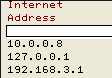
  • Find your ethernet line
    • most lines are numbered
      10.xxx.xxx.xxx or 192.xxx.xxx.xxx.
    • Your ethernet line may be numbered differently than the examples below
    • You can ignore the 127.0.0.1 IP address. This is an internal IBM address.
  • Press F11 (Display Interface Status) view the current line status.
  • If your line status is inactive type a '9' (Start) beside the line and press ENTER.
IBS Lumber and Building Material Software Copyright © 2006 IBS Lumber Software Inc (TM)
Last modified: November 7, 2011

IBS Sales & Support 888-640-1252
Main Office 888-640-1252
Fax IBS 877-712-8937

All pages contained in this support website are not intended for general public distribution. Any material here can be considered private, confidential with various copyrights and restrictions against public release. You 'the browser' cannot legally release this information for general public distribution.

remote support: http://www.gotomeeting.com | remote support download program