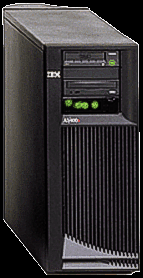
AS/400e server 270...Tuned for CPU Intensive Workloads
Server Workloads: The server 270 is IBM's most competitive
offering for customers seeking the value of AS/400 — security,
reliability, and scalability for workloads designed for
client/server and network-centric computing.
The server 270 is the entry offering for e-business with the
performance you need to handle CPU-intensive workloads that drive
mission-critical e-businesses.
The 270 server can also scale and grow to consolidate existing
multiserver scenarios. You want to gain e-business values of an
AS/400 and eliminate the cost and reliability exposures of a
multiserver heterogeneous implementation. The 270 is powerful enough
to handle multiple workloads effectively and efficiently or act as a
stand-alone server for concentrated robust implementations of a
single server application.
If you are considering any type of server workloads, the server
270 is an ideal platform. It can be used as a very secure Internet
server, for managing a small data warehouse, as your Lotus®
Domino server, or for serving up any number of applications. Unlike
most installations using PC server hardware, many of these
applications can be run concurrently on the same AS/400, saving cost
and increasing your overall profit.
Interactive Workloads: The server 270 offers optional
interactive features that deliver a preset level of interactive
performance for each processor. Adding the optional interactive
feature lets you run both server and interactive workloads on a
single platform. This is similar to the flexibility we introduced
for the 7xx servers in 1999.
For businesses looking to grow into more server workloads, the
server 270 is an ideal solution that lets you run multiple workloads
on a single server. As the requirements for interactive CPW
diminishes, the CPU cycles can be used for server workloads —
automatically.
Model 270 Summary (V4R5)
                      #2248       #2250       #2252       #2253
Processor Feature     (Uni)       (Uni)       (Uni)      (2-Way)

Main Storage (MB)
  Minimum              256         256         256         256
  Maximum              4096        4096        8192        8192

DASD Capacity (GB)
  Minimum              8.58        8.58        8.58        8.58
  Maximum             421.1       421.1       421.1       421.1

Maximums

Communication Lines     50          50          50          50
LAN Ports               8           8           8           8
Twinaxial Controllers   6           6           6           6
  Maximum Twinaxial    240         240         240         240
    Workstations
CD-ROM/Internal Tape    2           2           2           2
External Tape           3           3           3           3
Optical Libraries       4           4           4           4
Note: Capacities shown are for new models shipped from the
plant and include any prerequisite expansion features. Some
combinations of devices may be subject to configuration
restrictions.
Model 270 Server Performance (V4R5)
                      #2248       #2250       #2252       #2253
Processor Feature     (Uni)       (Uni)       (Uni)      (2-Way)

Processor CPW          150         370         950         2000
Interactive CPW
 Default                25         0(1)        0(1)        0(1)
 Optional               25          30          50          70
- 1 Provides support for system
administrative functions.
Relative performance measurements are derived from commercial
processing workload (CPW) on AS/400. CPW is representative of
commercial applications, particularly those that do significant
database processing in conjunction with journaling and commitment
control. CPW values may not be realized in all environments.
- Processor CPW — maximum relative performance for this
processor feature running commercial processing workloads. This
value, stated as Client/Server CPW in previous releases, can be
used to compare relative performance between various processor
features.
- Interactive CPW — relative performance available to
perform interactive workloads. The amount of interactive CPW
consumed will reduce the available processor CPW by the same
amount.
- Default: The measure of interactive CPW available as
part of the default offering.
- Optional: The maximum measure of interactive CPW
available via optional interactive features.
Model 270 Base System Description (V4R5)
A minimum functional server consists of the base server unit and
selected priced features. Included in the base server are the
physical package and power elements, a DASD controller, and an I/O
controller.
You must purchase:
- A processor
- An interactive card
- Minimum main storage
- Minimum DASD
- A CD-ROM unit
- A system console/communications adapter
Model 270 initial installation and designated features are
customer setup (CSU). Select from the following required Model 270
features:
Select one of the following:
.-----------------+-------+-------+-------+-------.
|Processor        | #2248 | #2250 | #2252 | #2253 |
|Interactive Card |       |       |       |       |
|-----------------+-------+-------+-------+-------|
|#1516 -- 0* CPW  |       |   X   |   X   |   X   |
|-----------------+-------+-------+-------+-------|
|#1517 -- 25 CPW  |   X   |       |       |       |
|-----------------+-------+-------+-------+-------|
|#1518 -- 30 CPW  |       |   X   |       |       |
|-----------------+-------+-------+-------+-------|
|#1519 -- 50 CPW  |       |       |   X   |       |
|-----------------+-------+-------+-------+-------|
|#1520 -- 70 CPW  |       |       |       |   X   |
|-----------------+-------+-------+-------+-------|
| * Provides support for system administrative    |
|   functions.                                    |
'-------------------------------------------------'
- Main Storage — Select a minimum of two of the same features:
- #3022 — 128 MB Main Storage
- #3024 — 256 MB Main Storage
- #3025 — 512 MB Main Storage
- Integrated Disk Units — Select one of the following:
- #4314 — 8.58 GB Disk Unit (Default)
- #4317 — 8.58 GB 10k rpm Disk Unit
- #4318 — 17.5 4 GB 10k rpm Disk Unit
- #4324 — 17.5 4 GB Disk Unit
- Integrated Optical Device — Select the following:
- System Console/Communications Adapter — Specify one of the
following:
- #5540 System Console on Twinaxial WSC
- #4746 PCI Twinaxial IOA
- #9771 Base PCI 2-Line WAN with Modem
- #5544 System Console on Operations Console (Default)
- #0367 Operations Console PCI Cable
- #4745 PCI 2-Line WAN IOA
- #9771 Base PCI 2-Line WAN with Modem
Note: ECS support requires feature #4745 (PCI WAN IOA)
- Uninterruptible Power Supply (UPS)
The Model 270 does not include an internal battery. An
external UPS is recommended to protect the system unit and any
external components against utility power outages. A UPS can
provide full operating power to allow the system to run
uninterrupted if utility power is lost for a short time. For
longer power outages, a UPS can maintain power long enough for
the system to shut down completely. You avoid losing data in
main storage that has not been written to disk, which can enable
faster recovery when the system is restarted.
The AS/400 Continuously Powered Mainstore/UPS (CPM/UPS)
Models 9910-080, 9910-140, and 9910-180, previously used with
the AS/400 Model 170, can also be used with the Model 270. The
CPM function is not supported on the Model 270. An external UPS,
combined with abnormal IPL recovery improvements in OS/400, can
provide an equivalent level of power protection and fast
recovery in the event of a power outage.
- Optional Features
To get full value and productivity from your server to
address your changing business needs, the AS/400e 270 server has
a comprehensive selection of optional features. Some are
new...others were available on the server 170.
Refer to the Priced Features and the New Servers
SB2 and SB3 Feature Description sections for tables showing
feature and specify code support, and descriptions of new
features.
Interactive Characteristics
Interactive CPW=0
This provides very attractive price/performance for customers
with a need for CPU-intensive applications such as Domino,
server-side Java, e-commerce tools, and a multitude of other
e-business offerings that generally see a higher ratio of CPU to I/O
utilization but with no need for 5250 interactive applications.
This feature can be ordered for most Model 270s. It supports
system administration functions performed by:
- A single interactive job
- Operations Navigator
- Any job submitted to batch
Interactive CPW=0 represents the maximum amount of 5250
processing capability available for customer applications.
Workload Balancing Enhancement
The new models offer significant advantages over earlier AS/400
models where system overhead reduces client/server capacity when the
interactive threshold is exceeded. With the new models, interference
with the client/server workload caused by excess interactive
workload is virtually eliminated.
Interactive Features
The level of interactive feature granularity on the 270 server
provides greater flexibility in choosing an appropriate interactive
feature.
AS/400e Server 270 Processor/Interactive Performance
Processor                   Interactive
Feature       Processor     Feature   Interactive
Number        CPW           Number    CPW

2248          150           1517       25
2250          370           1516        0 (2)
                            1518       30
2252          950           1516        0 (2)
                            1519       50
2253          2000          1516        0 (2)
                            1520       70
- 2 Supports system administrative
functions.
Upgrades
Upgrades into or out of the Model 270 are not supported; however,
within a Model 270, performance upgrades can be made simply through:
- Processor feature conversions
- Interactive feature conversions
Processor Feature Conversions Within the AS/400e server 270
From                        To

                  2250      2252      2253

2248              X         X         X
2250                        X         X
2252                                  X
Interactive Feature Conversions Within the AS/400e server 270
From                                        To

Processor      Interactive       2250      2252      2253
Feature        Feature          1516/     1516/     1516/
Number         Number          1518(3)   1519(3)   1520(3)

2248           1517               x         x         x
2250           1516               x         x         x
               1518                         x         x
2252           1516                         x         x
               1519                                   x
2253           1516                                   x
               1520
- 3 Interactive feature numbers
Euro Currency
This product is not impacted by euro currency.
Product Positioning
AS/400e server 270 delivers the processing power to competitively
run applications leveraging new technologies like Domino,
server-side Java, Web-enablers, and a multitude of other e-business
tools that generally drive a higher ratio of CPU versus I/O,
database, and other AS/400e resources.
The server 270 is really two servers in one4:
- A server with a base level of interactive performance of
zero
- A server with an optional level of interactive performance
to help support more traditional workloads
- 4 Not applicable to the first processor
point
The AS/400e server 270 is an ideal:
- Alternative to PC servers
- Replacement for older AS/400 and System/36™ units
- Server for running workloads designed for interactive,
client-server, or network-centric computing
- e-business solution introduction (for example, Domino, Java,
Internet)
- Development/test platform
- Department or multiples solution
Customers interested in a high-performing server for multiple
workloads, who intend to perform CPU-intensive processing should
select a server 270 with the base level of interactive performance
(enough to do system administration).
Customers who are moving toward a mixture of workloads that
include CPU-intensive applications should select a server 270 with a
higher optional level of interactive performance.
Customers who continue to have interactive processing
requirements should consider the value offered by the Models 250 or
820, where increased interactive performance is added more
economically.
If you have a non-RISC AS/400 model with less performance than
the server 270, you should evaluate this offering. If you are
running interactive applications dependent on 5250-type interfaces,
and are considering adding new server software, the server 270
provides an alternative with outstanding capabilities for both
environments.
If you have AS/400 D, E, or F models, you may find the server 270
an attractive purchase option (upgrades are not available). It has
considerably more power than many of these models. For example, a
Model F45 has a CPW rating of only 17 — the total available for
interactive and server workloads. The server 270 has a maximum
processor CPW of 2000, and an interactive performance maximum of 70.
AS/400e server 270 Compared to the Model 250: From a
server performance standpoint, the AS/400e server 270 offers much
more scalability than the Model 250. In addition, the expandability
is much greater, including 24 disk units, 8 GB of main storage, and
a 2-way processor for high-end growth.
Entry customers who purchased servers in the price range of the
Model 150, or Model 170, should consider the Model 250. Packaged
software and low entry prices make these servers attractive PC
server alternatives. The Model 250 performance enables running mixed
workloads on a single server. The Model 250 is not appropriate for
workloads requiring large amounts of processor cycles, versus more
traditional workloads that use a balance of system resources.
In terms of interactive performance (measured as interactive
CPW), the server 270 offers a single optional interactive feature
(except on the first processor) while the Model 250 offers
interactive capability as part of the base. Customers who run more
traditional applications with a dependance on interactive
performance should look to the Model 250 for the best value.
The smallest server 270 processor is offered for customers with
traditional AS/400 workloads who are considering future use of
CPU-intensive workloads such as server-side Java applications. A
processor upgrade will be required when new CPU-intensive
applications are deployed.
Trademarks
- AS/400e and System/36 are trademarks of
International Business Machines Corporation in the United States
or other countries or both.
- Netfinity, OS/400, and AS/400 are registered
trademarks of International Business Machines Corporation in the
United States or other countries or both.
- Windows NT is a trademark of Microsoft Corporation.
- Java is a trademark of Sun Microsystems, Inc.
- UNIX is a registered trademark in the United States
and other countries exclusively through X/Open Company Limited.
- Domino is a trademark of Lotus Development
Corporation.
- Lotus is a registered trademark of Lotus
Development Corporation.
- Other company, product, and service names may be
trademarks or service marks of others.
EZ-Setup
EZ-Setup simplifies AS/400® setup with a browser-like
GUI and an easy-to-follow sequence of dialogs on your PC attached to
an AS/400 using the Operations Console cable. The dialogs step you
through the setup process and minimize decisions where possible.
After you have completed your initial setup, you can continue with
the Next Step or launch Operations Navigator. The Next Step resides
on the same CD as EZ-Setup. EZ-Setup is delivered on a CD shipped
with the AS/400 system hardware. The code runs on a PC under
Windows™ 95, Windows 98, Windows NT™ 4.0, or Windows 2000 and
requires the Operations Console cable connected to the host AS/400.
There are two components to EZ-Setup:
- EZ-Setup Wizard
- The Next Step
The EZ-Setup Wizard leads you through these tasks:
- Installs Client Access Express and the components of
Operations
- Navigator needed by EZ-Setup
- Set the system name, date, time, and security values
- Creates security officer and system operator profiles
- Defines LAN connection for Token-Ring, Ethernet, or
Integrated NetFinity Server adapter
- Starts TCP/IP and selected servers
- Creates Internet shortcuts on the desktop for AS/400
Information Center, Technical Studio, AS/400 Home Page, AS/400
Client Access, and AS/400 Technical Support
- Installs Netscape Navigator browser, if needed
- Configures the Operations Console so that it is ready to use
when EZ-Setup finishes
- Performs initial NetServer configuration for Client Access
by setting the System and Domain names for NetServer
- Gives the user the option to launch Operations Navigator —
the premier graphical interface to the AS/400
- Provides an option to start Client Access Express install
from initial screen
- Provides a path for upgrading from a twinaxial console to an
Operations Console
|