IBM Server Site

IBS Home Up

Rebuild an Invoice Register

*IMPORTANT

  • Dates displayed are the ones you select. The report will always say 'Monthly Invoice Register' regardless of the number of dates selected.

Additional Resources

When do I do this

  • when you need a replacement daily invoice register
  • when you need a replacement monthly invoice register
  • when you want to see sales in a date range

Quick Version

  1. Go to ZU (System Support Menu)
  2. Select option 19 (System Administrators Menu)
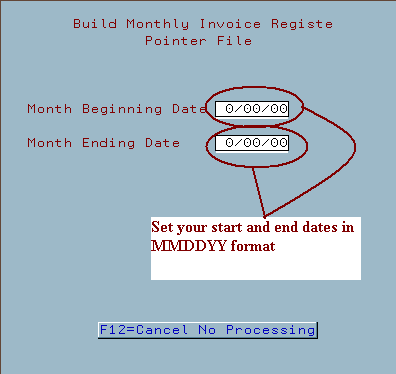
  3. Select option 16 (Build Pointers for Monthly Invoice Register)
  4. Set Month Start and End dates
  5. Run your monthly invoice register (MP 20, 5 or MP 2, 5)
  6. After monthly has begun printing you must again reset your dates back to the correct month and date (ZU 19, 16)
IBS Lumber and Building Material Software Copyright © 2006 IBS Lumber Software Inc (TM)
Last modified: November 7, 2011

IBS Sales & Support 888-640-1252
Main Office 888-640-1252
Fax IBS 877-712-8937

All pages contained in this support website are not intended for general public distribution. Any material here can be considered private, confidential with various copyrights and restrictions against public release. You 'the browser' cannot legally release this information for general public distribution.

remote support: http://www.gotomeeting.com | remote support download program