|

 
| |
Sale Price Card Setup
See Also
Fields
- MFG SUGGEST PRICE (prints on 1st line)
- REGULAR PRICE (prints on 2nd line)
- SALE PRICE (prints on 3rd line)
- BARCODE (prints at the bottom)
Where to Update Fields
- UPC Setup

- 16 (Select Field Maintenance),
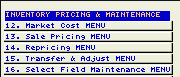
- 7 (UPC and Vendor Maintenance)

- type in the selected sku #

- key in a 12 digit number (no letters)
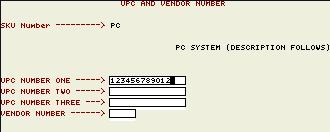
-
MUST BE 12 DIGITS NUMERIC or it WON'T WORK
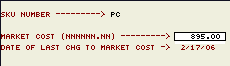
- Setup MFG Suggested Price
- 2 Market Cost Maintenance
- If
the sku has never been setup before you must enter in option 1
(Market Cost Setup 1st)
- Setup Regular Price
- 16 (Select Field Maintenance),
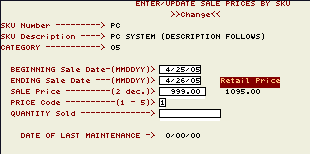
- Setup Sale Price
- 1 (Enter Sale Prices by Sku)

- Type in the sale dates & information
- Print Labels

- 21 (Bar Code & Price Sticker Menu)

- 15 (Print Sale Price Posters)
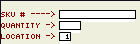
- Change Paper & Answer Messages
- Unload continuous form paper
- Flip Lever on Front right of printer to up (single sheet) position
- Open drop down part of front panel
- Put 1 (One) poster/card in the form feeder
- Answer forms messages on printer
|

