|

 
| |
Federal Tax ID Numbers
Additional Resources
- GL Setup Overview
- Category Setups (GU
21, 1 also IU 9)
- System Configuration (GU
21, 2 also MU 2)
- Tax code setup (GU
21, 3 also RU 8)
- Transfer Account Setup (GU
21, 4 also MU 10)
- Chart of Accounts (GU 21,
5 also GU 15, 1)
- Financial Format Member (GU 21,
6 also GU 15, 3)
- Vendor Setup (GU
21, 7 also OU 5 and AU 11)
- Vendor GL Assignments (GU 21, 8)
- Department Master (GU 21, 12 also PU 12)
- Unemployment Insurance (GU 21, 13 also PU 13)
- State Disability Insurance (GU 21, 14 also PU 14)
- Payroll Tax Accounts (GU 21, 15 also PU 15)
- Payroll Tax Tables (GU 21, 16 also PU 16)
- Additional Earned Income (GU 21, 17 also PU 17)
- Federal State ID Numbers (GU
21, 19 also PU 19)
- Payroll Control
File (GU 21, 20 also PU 20)
Entering Federal / State ID Numbers
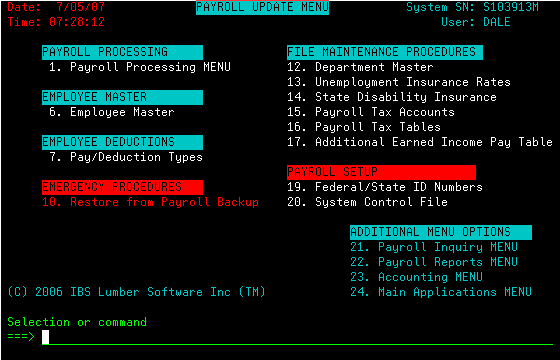
- Go to MENU PU (Payroll Update)

- Select Option 19 (Federal/State ID)

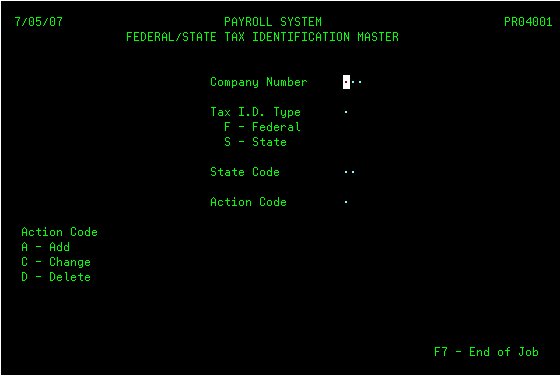
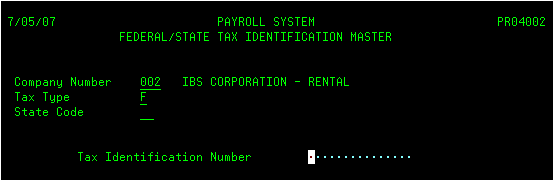
- Next key in the data as follows
- Finally key in the id code then press ENTER.

|