|

      
| |
General Ledger Setup Checklist
Additional Resources
- GL Setup Overview
- Category Setups (GU
21, 1 also IU 9)
- System Configuration (GU
21, 2 also MU 2)
- Tax code setup (GU
21, 3 also RU 8)
- Transfer Account Setup (GU
21, 4 also MU 10)
- Chart of Accounts (GU 21,
5 also GU 15, 1)
- Financial Format Member (GU 21,
6 also GU 15, 3)
- Vendor Setup (GU
21, 7 also OU 5)
- Vendor GL Assignments (GU 21, 8)
- Department Master (GU 21, 12 also PU 12)
- Unemployment Insurance (GU 21, 13 also PU 13)
- State Disability Insurance (GU 21, 14 also PU 14)
- Payroll Tax Accounts (GU 21, 15 also PU 15)
- Payroll Tax Tables (GU 21, 16 also PU 16)
- Additional Earned Income (GU 21, 17 also PU 17)
- Federal State ID Numbers (GU
21, 19 also PU 19)
- Payroll Control
File (GU 21, 20 also PU 20)
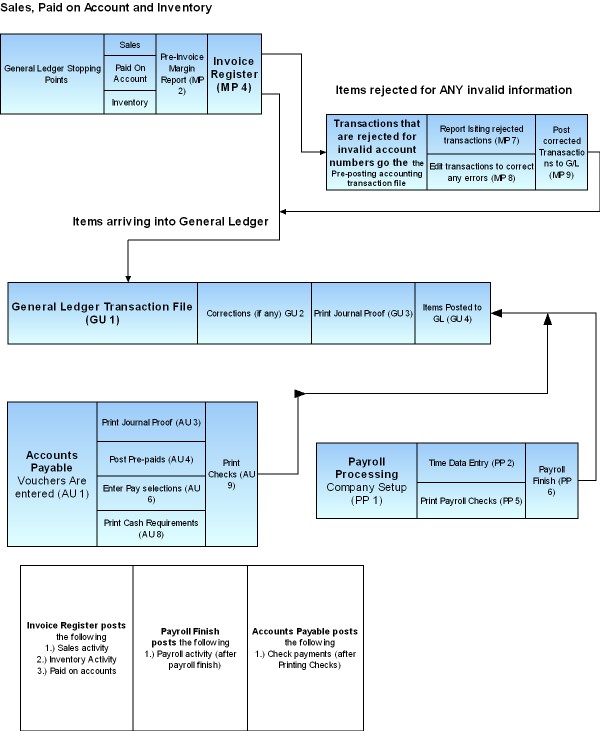
- Tracking how
information gets to the G/L
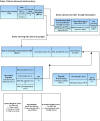
Data Process Path to G/L
GU 21 (G/L Setup/Config Menu)
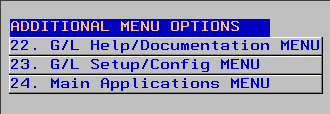
Setup
- Setup Categories for IBS Post
- Setup system configuration for IBS Post
- Setup G/L Chart of Accounts
- Setup Financial Format Member
- Setup Vendors
(Don't forget to add company number and default G/L number to each vendor)
- Setup Federal and State IDs
- Setup Payroll withholding
Warnings and G/L Pitfalls
The following issues have appeared over the years and should be noted BEFORE
you attempt to manage your General Ledger!
- Setting up a
G/L without professional accounting advice means you are MOST LIKELY going
to have many errors and mistakes in your G/L
IBS never offers
professional accounting advice. We are neither accountants nor CPA's.
Your accountant has the final say over any accounting matters. Consult
him/her regularly and at every step of the G/L setup.
- We recommend that you have at least one
1/2 time or full person dedicated to maintaining your books. It is NOT
an easy job to manage a G/L.
-
READ YOUR REPORTS!
READ YOUR REPORTS! READ YOUR REPORTS! READ
YOUR REPORTS! READ YOUR REPORTS!
Most problems can be
found in the daily/weekly reports. If you catch them early it is much
easier than attempting to fix a problem from 3-11 months earlier.
- Make a
written routine of what steps to take at the end of each day,
week, period, etc. Understand that skipping, forgetting and bypassing
steps doesn't work.
- Read
your reports daily. Fix the problem during the week it
happens and you will sleep better each night.
- During the 1st 3 months of your G/L Transition you will most likely
have some accounts that are invalid. Fix them immediately to insure
success.
|