IBM Server Site

IBS Home Up

Fixing Rejected / Out of Balance Tickets

Cause of out of balance | Access to Fields | Fields that can be skipped | Required Fields | Credit Fix Example

Example of a rejected tickets report | Example of a successful ticket posting report

Step by Step

  1. Get a copy of the original ticket. You will need it to input the missing lines of information.
  2. Go to a command line
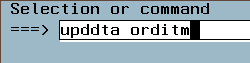
  3. Type 'upddta orditm' then press ENTER.

  4. Key in the order number AND line number (usually '001') then press ENTER.

  5. If you receive the error 'Record not found press F10 to start data entry and continue

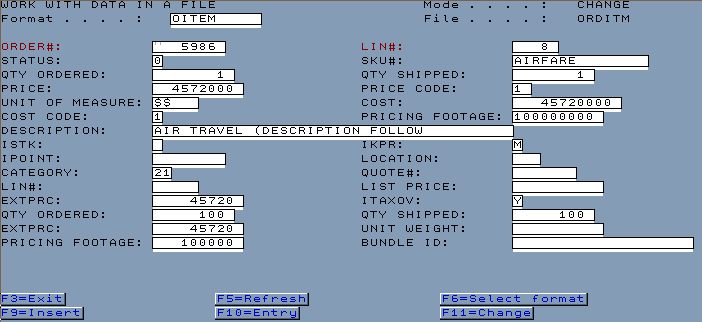
  6. ENTER in the key fields (HIGHLIGHTED IN RED)
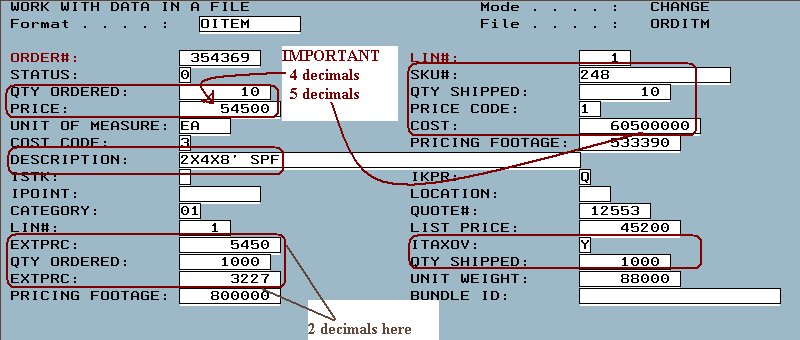
    • Example of a positive (cash or charge ticket) line item
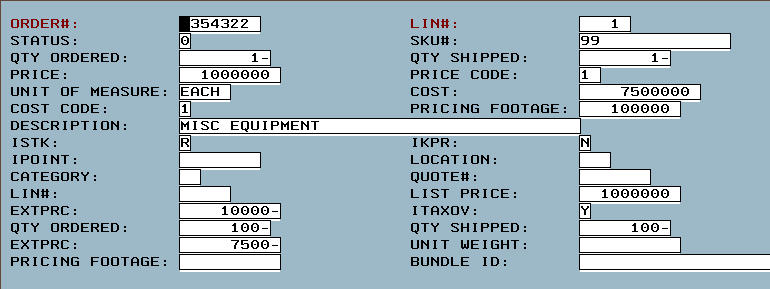
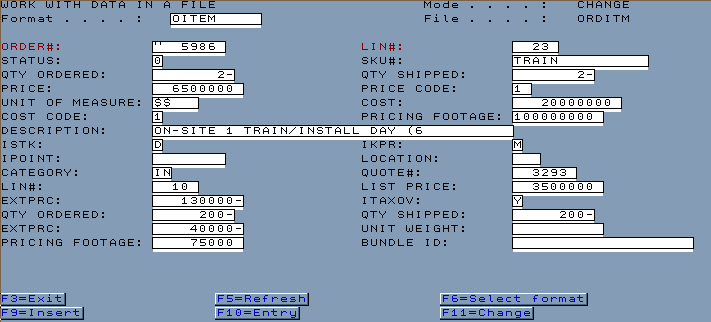
    • Example of a credit line item (Credit tickets)

  7. After making corrections and data entries rerun your daily invoice register

    Example of a successful invoice register posting report


    Example of a rejected tickets report

Cause of out of balance

  • Power loss while doing a sale
  • Power drop while doing a sale
  • Rebooting while doing a sale
  • Loss of connectivity while doing a sale

[back to top]


Access to Fields

  • upddta orditm (update data in the order item file)
  • If the field(s) don't exist you may have to do an F10

[back to top]


Required Fields

  • IMPORTANT -
ORDER#: ENTER IN YOUR ORDER NUMBER LIN#: ENTER IN THE LINE NUMBER (USUALLY 01) You may need to do an 'F10' to add a line.
STATUS: 0 SKU#: ENTER IN YOUR SKU NUMBER
QTY ORDERED: ENTER IN YOUR QUANTITY QTY SHIPPED: 1
PRICE: ENTER IN THE PRICE (THERE ARE 4 DECIMALS HERE) PRICE CODE: 1
UNIT OF MEASURE: $$ COST: ENTER IN THE COST OF THE PRODUCT (THERE ARE 5 DECIMALS HERE)
COST CODE: 1
DESCRIPTION: ENTER IN A PRODUCT DESCRIPTION
IKPR: ENTER IN THE OVERRIDE CODE (USUALLY 'M' FOR MANUAL OVERRIDE)
LIN#:
EXTPRC: ENTER IN PRICE OF QTY SHIPPED X PRICE (THERE ARE 2 DECIMALS HERE) ITAXOV: ENTER IN TAXABLE YES OR NO 'Y' 'N'
QTY ORDERED: TYPE IN THE SHIPPED QUANTITY (THERE ARE 2 DECIMALS HERE) SHIPPED: TYPE IN THE SHIPPED QUANTITY (THERE ARE 2 DECIMALS HERE)
EXTPRC: ENTER IN PRICE OF QTY SHIPPED X PRICE (THERE ARE 2 DECIMALS HERE)

[back to top]


Negative Out of Balance for Credit Returns

  • Example 1

Fields You can Ignore

[back to top]

IBS Lumber and Building Material Software Copyright © 2006 IBS Lumber Software Inc (TM)
Last modified: November 7, 2011

IBS Sales & Support 888-640-1252
Main Office 888-640-1252
Fax IBS 877-712-8937

All pages contained in this support website are not intended for general public distribution. Any material here can be considered private, confidential with various copyrights and restrictions against public release. You 'the browser' cannot legally release this information for general public distribution.

remote support: http://www.gotomeeting.com | remote support download program