IBM Server Site

IBS Home Up

How to Sub-total on a quote

See Also

How it works

A sub-total (*SUB) in the comment line will sub-total everything on the quote, PO or ticket since the last sub-total.

The totals are only displayed on the final printed document.

Brief Instructions

  1. Tab or Field Exit over to the Sku field
  2. Enter a '.' (Period) in the Sku field then press ENTER.
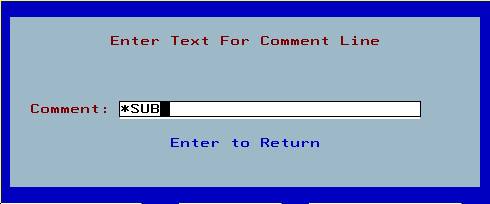
  3. Enter '*SUB' (Sub-total) in the comment line then press ENTER.

Step by Step Instructions

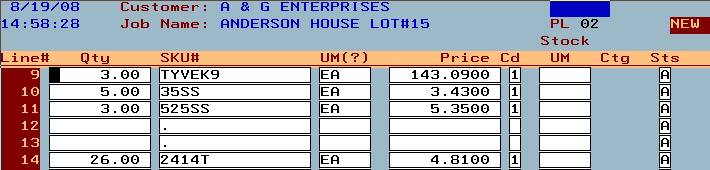
1.) Create a comment line with a ‘.’ (period) in the Sku field.

*notice that there is nothing in the ‘Qty’ (Quantity) field.

2.) Enter ‘*SUB’ (Sub-total) in the comment line that appears.

3.) A sub-total will subtotal everything on the quote, po or ticket since the last subtotal.

IBS Lumber and Building Material Software Copyright © 2006 IBS Lumber Software Inc (TM)
Last modified: November 7, 2011

IBS Sales & Support 888-640-1252
Main Office 888-640-1252
Fax IBS 877-712-8937

All pages contained in this support website are not intended for general public distribution. Any material here can be considered private, confidential with various copyrights and restrictions against public release. You 'the browser' cannot legally release this information for general public distribution.

remote support: http://www.gotomeeting.com | remote support download program