|

    
| |
GU 21 - Setup Maintenance
Additional Resources
- GL Setup Overview
- Category Setups (GU
21, 1 also IU 9)
- System Configuration (GU
21, 2 also MU 2)
- Tax code setup (GU
21, 3 also RU 8)
- Transfer Account Setup (GU
21, 4 also MU 10)
- Chart of Accounts (GU 21,
5 also GU 15, 1)
- Financial Format Member (GU 21,
6 also GU 15, 3)
- Vendor Setup (GU
21, 7 also OU 5)
- Vendor GL Assignments (GU 21, 8)
- Department Master (GU 21, 12 also PU 12)
- Unemployment Insurance (GU 21, 13 also PU 13)
- State Disability Insurance (GU 21, 14 also PU 14)
- Payroll Tax Accounts (GU 21, 15 also PU 15)
- Payroll Tax Tables (GU 21, 16 also PU 16)
- Additional Earned Income (GU 21, 17 also PU 17)
- Federal State ID Numbers (GU
21, 19 also PU 19)
- Payroll Control
File (GU 21, 20 also PU 20)
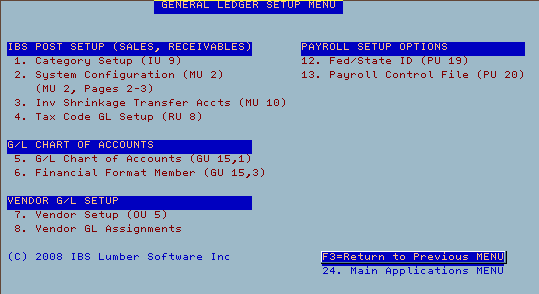
2008 Version 2 Menu
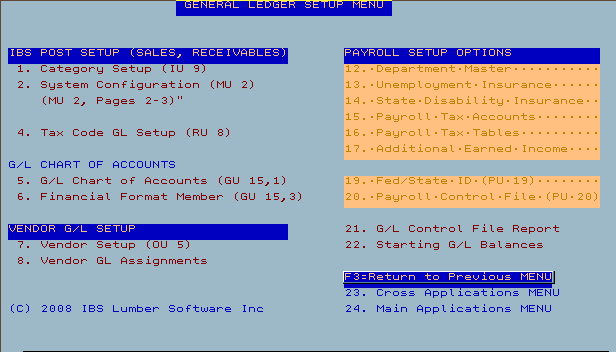
2008 Version 1 Menu

- Option 1 - Category Setup
this option will assign every sku within that category
to a specific general ledger number. If no G/L number is specified
then the default G/L number in the System Configuration (MU 2) is used
- Option 2 - System Configuration
Go to pages 2-3 (skip pages 1a-1d)
Enter in the default system values for your G/L numbers
- Option 3 - Inventory Shrinkage and Transfer
Accounts
- Line 19 is used for inventory shrinkage
- Line 20 is your default transfer account
- Lines 21+ are your transfer accounts per job
- Option 5 - G/L Chart of account
This option enables you to manage your chart of
accounts.
- Option 6 - Financial format member
You setup your format member with your accountant.
- Option 7 - Vendor setup
Select this option to update the default G/L account
on each Vendor
- Option 8 - Vendor G/L Assignments
Select this option to quickly update all the default
G/L accounts on each Vendor
- Option 12 - Federal /State ID (PU 19)
Select this option to set your federal and state ID
numbers.
- Option 13 - Payroll control file (PU 20)
This is the main payroll configuration file.
|