IBM Server Site

IBS Home Up

How to Assign Printing

Workstation Setup | IBS Printer Setup | Assign a user to a Specific Printer | Setup Default System Printer

Additional Resources

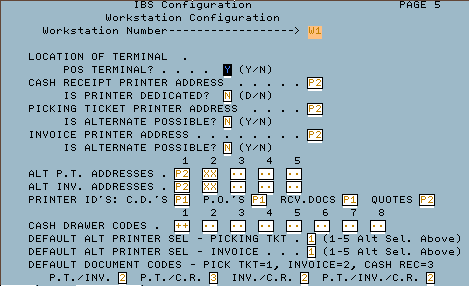
Workstation Setup

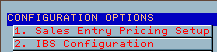
  • MU, 2 (IBS Configuration)
    • F3 six times
    • F9
    • Type in Workstation then assign printer(s)

[top]


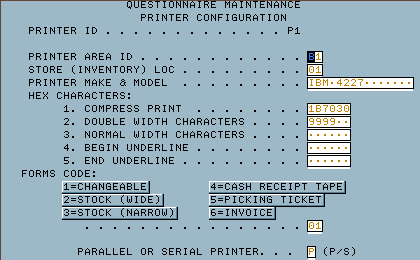
Printer Setup in IBS Software

  • MU 6 (Printer Configuration)
    • Type in Printer ID
    • Type in Printer assignments
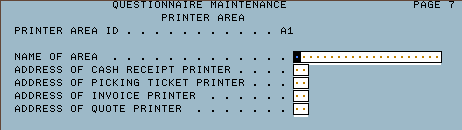
    • F9 to setup Areas
    • Setup Areas like examples below
      • Front Counter FC
      • Back Office BO
      • Location 1 L1
      • Location 2 L2
      • etc.
    • F9
    • F7 to exit

[top]


Assign a Workstation to Always print reports at a specific location

  • Esc (or Systems Attention)
  • Work with configuration status (usually option 18 or 19)
  • Type an '8' (Work with Description) beside the workstation ID
  • Type a '2' (Change) beside the workstation ID
  • Change the Print Device to the desired printer (i.e. P3, P4, PX etc.)
  • Sign off then back on to pick up new settings

[top]


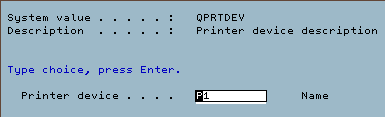
Setup a Default System Printer

  • from a command line type 'WRKSYSVAL QPRTDEV' then ENTER.
  • Type in the new system default printer

[top]

IBS Lumber and Building Material Software Copyright © 2006 IBS Lumber Software Inc (TM)
Last modified: November 7, 2011

IBS Sales & Support 888-640-1252
Main Office 888-640-1252
Fax IBS 877-712-8937

All pages contained in this support website are not intended for general public distribution. Any material here can be considered private, confidential with various copyrights and restrictions against public release. You 'the browser' cannot legally release this information for general public distribution.

remote support: http://www.gotomeeting.com | remote support download program